
Inherited list under review
ExampleDo not send
Nothing to import
Proof and permission first
Keep sending
The reasoning, in plain English
Do this first
Free guide and PDF checklist
For: anyone holding email addresses they did not collect themselves. A file a seller sent you, a list that came with a company you bought, or a list a colleague left behind when they moved on.
The 60-second answer
A list arrived that you did not build. Maybe you paid for it, maybe it came with a company, maybe it was sitting in a shared drive. This guide sorts it out in seven checks, so you know who you can email, who you need to ask first, and who you should leave alone. It is free and all of it is on this page.
Permission does not come with the file. People said yes to the sender they signed up with, not to whoever holds their address next. That stays true when a list is bought, rented or arrives with a company you acquired.
A bought list is a "do not send". The people on it never asked to hear from you, and the seller's promise that it is "opt-in" does not protect you.
An inherited list can be earned, not assumed. Check what each person agreed to and who they said yes to, and clean what is left. Then mail only the people whose yes you can show. After an acquisition, send a single email from the name they know and keep only the people who say yes.
Every explanation on this page comes from the Email Almanac, our own library of more than 4,000 answers about email. You do not have to buy anything to read it.
Which case are you?
Two quick picks: what kind of list it is, and what proof you hold. The card shows whether you may use it, and what to do first.
Answer here and your row lights up, with what to do first. The PDF has every row and the full guide.
Inherited list under review
ExampleThe reasoning, in plain English
Do this first
The guide
One line each. Tick them as you go. Open a step for the full explanation.
Why:they look the same in a spreadsheet and they are not the same.
They look the same in a spreadsheet and they are not the same.
Why:most email marketing tools forbid bought lists and can suspend an account when complaints climb.
Do not import it into your email marketing tool and do not send to it. Most email marketing tools forbid bought lists in their terms and can suspend an account when complaints climb. "Targeted" is a sales word, not permission. A narrow, relevant list is still a list of strangers. In the EU and Canada, mailing people who never agreed to hear from you is against the law, not only bad practice. If you already paid for it, get legal advice before you do anything with it. In the EU the safest answer is not to use it at all.
Why:their complaints count against your sender reputation, not the list owner's.
Renting is not safer than buying. The people on a rented list said yes to the list owner, not to you, and their complaints count against your sender reputation, not the list owner's. The send builds nothing for your own reputation. When the rental ends, you are where you started.
Why:proof means the exact words the person saw, when they said yes, where, and your organisation named.
For each address, look for how it was collected: a screenshot of the signup form with its wording, a timestamp, an order record, or a written agreement with the original collector. Proof means the exact words the person saw, when they said yes, where, and your organisation named, not hidden under "trusted partners". The burden of proof sits with whoever sends, not with whoever handed you the list.
Why:clear proof and recent activity can stay. Ask first whether you need to email the rest at all.
Clear proof that names your organisation, and recent activity: these people can stay. Partial proof or a long silence: ask first whether you need to email them at all. Often you do not, so mail only the people whose yes you can show and leave the rest out until they sign up again. Send a permission email only if you really need one, for example where a law sets a deadline, as Canada's CASL does. No proof, or proof that names someone else: do not import them. If the list came with a company or brand you bought, everyone on it said yes to that company, not to yours. So every person you keep gets the permission email in step 7, however good their proof. Permission also ages. No law sets an expiry date, but most senders ask again after 12 to 18 months of silence.
Why:keep total bounces under 2 percent and hard bounces under 0.5 percent.
Check them with Review My Emails, first 1,000 free
Check every address that will get the permission email before it goes out. Mailing dead addresses spikes your bounce rate right when you most need to look healthy. Keep total bounces under 2 percent and hard bounces under 0.5 percent. A valid address can still be a poor send, which is why cleaning looks past "does it exist".
Why:after an acquisition, the permission email comes from the original sender's domain.
After an acquisition, the permission email comes from the original sender's domain. It says who owns the list now, what will change, and asks people to choose to stay. Keep it plain, with one button such as "Yes, keep me subscribed". Set a deadline of 7 to 14 days and say it in the email. Anyone who has not said yes when it closes is suppressed, not imported.
Your plan
What your answers mean
| Your list | Do this first |
|---|---|
| Bought from a seller, any price, any promise | Do not send. Build your own list through a signup form people choose to fill in |
| Rented, sent by the list owner | Nothing to import. Treat it as a paid placement and grow your own list |
| Shared through a partner's signup form | Treat it like inherited: check what each person saw before anything else |
| Came with a company or brand you acquired | Clean the people with proof, then one permission email from the original sender to all of them. Keep only the yeses |
| Inherited inside your own organisation, or your own but old, with clear proof and recent activity | Clean it, then keep sending as normal |
| Inherited inside your own organisation, or your own but old, with partial proof or a long silence | Ask first whether you need to email them at all. Often you do not, so mail only the people whose yes you can show. If you must ask, clean first, then one permission email, and keep only the yeses |
| Any list with no proof at all | Do not import |
Worked example. Skipper Mako runs Tidewell Supply Co. and has just bought Driftwood Goods. Its list, driftwood-customers.xlsx, holds 12,000 addresses. A folder next to it holds trade-show-leads-purchased.csv. Skipper deletes nothing and sends nothing yet. The purchased file is set aside untouched, because nobody on it agreed to hear from either company. For the customer list, the signup records show 7,000 people joined through the Driftwood Goods form, and 3,000 of those clicked something last year. The other 5,000 have no record at all. Skipper uploads the 7,000 to Review My Emails. Every address comes back To Keep, To Monitor or To Suppress, with the reason in plain English. Nobody marked To Suppress gets mailed. The rest get one plain email from the Driftwood Goods address: "Driftwood Goods is now part of Tidewell Supply Co. Want to keep hearing from us?", with one button and a two-week deadline. The 3,000 recent clickers get it too, because they said yes to Driftwood Goods, not to Tidewell. The people who click become the start of Skipper's list. The 5,000 with no record are never imported.
Review My Emails
You sign up, upload your list and get every address back with one decision and the reason, in plain English. Big lists take a while, so we email you when yours is ready.
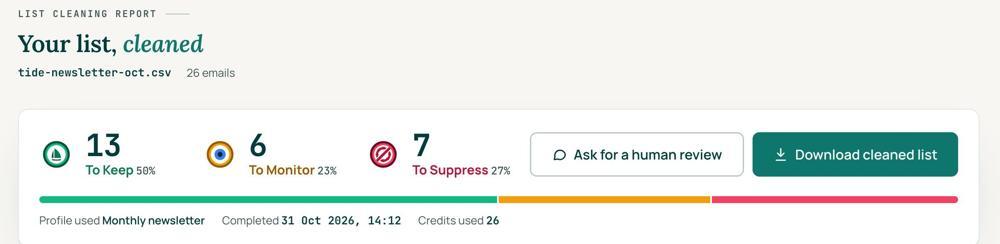
 To KeepSend to it.
 To MonitorSend carefully and watch what happens.
 To SuppressStop sending to it, and keep the record of who you stopped emailing.
Your first 1,000 are free
Create an account and your first 1,000 addresses are free. No card is needed to sign up. After that you pay for the size of your list, from $0.0080 an address down to $0.0026 at volume, with an $8 minimum. There is no subscription and no monthly minimum.
Human Review
If you want a person to look, ask for a Human Review from your report, and Yanna-Torry goes through your list herself.
Your next step. If the list is yours to mail, or you inherited it and are about to ask permission, clean it first. Upload it and clean your first 1,000 addresses free at reviewmyemails.com/get-started. Not sure which pile a list belongs in? Ask the free SOS line before you send anything.
List cleaning does not fix SPF, DMARC, MX or blocklist problems. Those live in your sending setup, and they are a different job. A blocklist listing measures your sending, so it is never a reason to suppress anyone on your list. And nobody can promise you the inbox, so we do not.
Yanna-Torry Aspraki, Review My Emails
Email SOS Hotline, free
For those problems there is the Email SOS Hotline, our free help line. Tell Yanna-Torry what is going on and she will tell you what she would do. She reads every message herself and replies within 48 to 72 hours, with no pitch.
Ask the free SOS line Trust beats tactics™
Founded in 2020, based in Bolton, United Kingdom.
reviewmyemails.com/resources/bought-rented-inherited-list?c=web-p10-r23pdf · v1
Spotted something out of date?