
Bounce under review
Example To Keep
 To Monitor
 To Suppress
The reasoning, in plain English
Do this first
Free bounce code guide and PDF
For: anyone holding a bounce they do not understand. A bounce report from your email marketing tool, a reply from MAILER-DAEMON, or one strange code that keeps coming back.
The 60-second answer
A send came back with a line like 550 5.1.1 User unknown and you want to know what it means for you. Paste the line, or type the code, and the row that matches lights up below. Every row is on this page, and the guide under it shows you how to read any bounce yourself.
The first digit tells you if it is over. 4 means temporary, so your sending server tries again. 5 means permanent, so trying again will not change it.
Suppress at once only when the address is dead. "User unknown" and "domain not found" mean the address is gone. Reputation and authentication bounces mean the receiver has a problem with the sender, and a policy bounce can also come from the receiver's own rules. Either way, suppressing the address fixes nothing.
Watch the totals. Keep total bounces under 2 percent and hard bounces under 0.5 percent.
Every explanation on this page comes from the Email Almanac, our own library of more than 4,000 answers about email. You do not have to buy anything to read it.
Which case are you?
Paste a bounce line or type just the code. The card gives you the verdict and what to do first.
Answer here and your row lights up, with what to do first. The PDF has every row and the full guide.
Bounce under review
ExampleTo KeepTo MonitorTo SuppressThe reasoning, in plain English
Do this first
The guide
One line each. Tick them as you go. Open a step for the full explanation.
Why:the numbers mean the same thing at every provider. The words after them are free text, and each provider writes its own.
A bounce usually carries a three-digit reply code. 2xx means it worked, 4xx is a temporary failure the server can retry, and 5xx is a permanent rejection. Many bounces also carry an enhanced code in the form X.Y.Z, such as 5.1.1. The first digit is the class (2 success, 4 temporary, 5 permanent), the second is the subject (1 the address, 2 the mailbox, 3 the system, 4 the network, 5 the protocol, 6 the content, 7 security and policy) and the third is the exact condition. The numbers mean the same thing at every provider. The words after them are free text, and each provider writes its own.
Why:never suppress an address on a single 4xx. Watch the pattern instead.
A 4xx is the server saying "try again later", not "this address is dead". Never suppress an address on a single 4xx. Watch the pattern instead. A 5xx is permanent and retrying will not change it, but not every 5xx means a dead address. Some mean the receiver has a problem with your authentication, your content or your reputation. Always read the text after the code, not just the number.
Why:with a block bounce the mailbox exists. Suppressing the address fixes nothing.
Run the free blocklist checkCheck SPFCheck DMARC
"User unknown" and "domain not found" mean the address is dead. Reputation, content and authentication bounces mean the receiver does not trust the sender. A block bounce means the mailbox exists and the server is healthy, but the server refuses mail from you, or the receiving company's own rules do. Suppressing the address fixes nothing, because the same block hits every message you send to that server. As a rule of thumb, 5.1.x is usually an address problem, 5.2.x a full mailbox, 5.4.x routing, and 5.7.x policy or authentication.
Why:use Final-Recipient for your suppression list, not the address you sent to.
A bounce message (a DSN) has a plain-language part, a machine-readable part and often a copy of the original headers. In the machine-readable part, Status is the X.Y.Z code, Action says failed, delayed or delivered, Diagnostic-Code is the receiver's own words with the real reason, and Final-Recipient names the address. Use Final-Recipient for your suppression list, not the address you sent to. A real bounce comes from MAILER-DAEMON or postmaster with a delivery report attached. An out-of-office reply is not a bounce, and the address stays active.
Why:keep total bounces under 2 percent and hard bounces under 0.5 percent.
Keep total bounces under 2 percent and hard bounces under 0.5 percent. Suppress a hard bounce the first time it happens. For soft bounces, suppress after three campaigns in a row with no delivery in between, or at once if the soft bounce turns into a 5xx. A clean delivery resets the count. Stop as soon as the code moves from 4xx to 5xx.
Why:a low bounce rate does not prove a clean list. Delivered only means the receiving server said 250 OK.
A low bounce rate does not prove a clean list. Mail that lands in the spam folder still counts as delivered. "Delivered" only means the receiving server said 250 OK. It says nothing about the inbox. And a blocklist does not always bounce you. Many providers accept the mail and then put it in spam or drop it quietly.
Your plan
What your code means
| Your bounce | Do this first |
|---|---|
The address is gone. 5.1.0, 5.1.1, 5.1.2, 5.1.3, 5.1.10, 5.2.1, 5.4.4, 551 or 553, or 550 with "user unknown", "recipient not found", "domain not found" or "mailbox disabled" | Suppress the address now and never retry it. Nothing else fixes a dead address |
The mailbox is full. 4.2.2 or 5.2.2, or 452 or 552 with "over quota", "mailbox full" or "inbox is full" | Keep sending as normal, then suppress after about three bounces in a row. An address that keeps coming back full is effectively inactive |
Try again later. 450, 451, 454, 4.7.1, 4.4.3, Yahoo's [TS03], or any 4xx with "try again later" or "temporarily deferred" | Do nothing yet. Your email marketing tool retries on its own, often for 48 to 72 hours. Suppress only after three campaigns in a row with no delivery |
You are sending too fast. 421, 4.7.0 or 4.4.2 with "rate", "too many connections" or "too frequent", 452 with "too many recipients", Microsoft's 421 RP-001, RP-002 or RP-003, or Yahoo's [TS01] | Slow down and spread the volume out. It is a rate limit, not a block, and not a reason to suppress anyone. Yahoo's [TS01] also points at your IP's reputation. For too many recipients, split the batch |
The receiver refuses you. 5.7.0, 5.7.1, 5.7.28, 5.7.606, 5.7.708, 554, or any 5xx with "policy", "blocked", "reputation", "spam" or "complaints" | Keep the address. Suppressing it changes nothing. Check your reputation and run the free blocklist check |
Your authentication failed. 5.7.23, 5.7.26, 5.7.27, 5.7.30, 5.7.32, 5.7.40, or any code that names SPF, DKIM or DMARC | Fix SPF, DKIM and DMARC on your sending domain. Cleaning the list will not fix this one. Check your records with our free SPF and DMARC checkers, see whether DKIM passed with the free email header analyzer, or ask the free SOS line |
Your setup or your message. 500 to 504, 5.3.4, 5.2.3, 5.7.8, 5.7.25, or 552 with "too large" or "size" | Fix it on the sending side. 500 to 504 are commands or settings the receiving server will not take. A 501 about a bad recipient address means the address itself is malformed, so fix it and resend. For a message that is too large, link to the file instead of attaching it. A 5.7.8 means the login your sending tool uses for the mail server failed, so fix the SMTP username and password. A 5.7.25 means your sending IP has no reverse DNS (PTR) record, which your email platform sets up |
| Too many dead addresses across the send. Yahoo's [TS02], or hard bounces over 0.5 percent of a send, or total bounces over 2 percent | Stop and clean the list before the next send. Check older lists before you mail them |
| Provider | Code | What it means |
|---|---|---|
| Gmail | 550 5.7.26 | Your mail failed authentication |
| Gmail | 5.7.27 / 5.7.30 | SPF did not pass / DKIM did not pass |
| Gmail | 550 5.7.28 | An unusual rate of unwanted mail from your IP address. Not an authentication problem |
| Gmail | 550 5.7.25 | Your sending IP has no reverse DNS (PTR) record |
| Gmail | 421 4.7.0 | Temporary throttling, retried |
| Gmail | 550 5.1.1 | The address does not exist |
| Gmail | 552 5.2.3 | The message is too large |
| Yahoo | 421 4.7.0 [TS01] | Throttling for IP reputation |
| Yahoo | 421 4.7.1 [TS02] | Too many unknown users in your sends, a list problem |
| Yahoo | 421 4.7.0 [TS03] | A general deferral |
| Microsoft | 550 5.1.10 | Recipient not found |
| Microsoft | 550 5.7.606 / 5.7.708 | A banned sending IP / mail from this IP is not accepted |
| Microsoft | 421 RP-001 / RP-002 / RP-003 | A rate limit, a rate limit on one connection, too many connections at once. Not a block, but tied to your IP or domain reputation |
Gmail often hides the real reason behind a general 550 5.7.1 or 550 5.7.26. Read it alongside Google Postmaster Tools and a check of your SPF, DKIM and DMARC.
Worked example. Gil Brinewater sends the monthly newsletter for Kelp Street Bakery from news@kelp-street.example. This month's send brings back two kinds of bounce. Twelve look like 550 5.1.1 User unknown, including bo.unce@pearl-diver.invalid, a reader who changed jobs. That is row 1: those addresses are gone, so Gil suppresses them and never retries. Then a block of Gmail bounces all say 550 5.7.26. That is row 6: nothing is wrong with those readers. Gil's new website host changed the domain's records last week, and Gmail can no longer confirm the mail is his. Suppressing those readers would have thrown away good customers and fixed nothing. Gil fixes the records, checks them with the free SPF and DMARC checkers, and before the next send uploads the list to Review My Emails. Every address comes back To Keep, To Monitor or To Suppress, with the reason in plain English.
Review My Emails
You sign up, upload your list and get every address back with one decision and the reason, in plain English. Big lists take a while, so we email you when yours is ready.
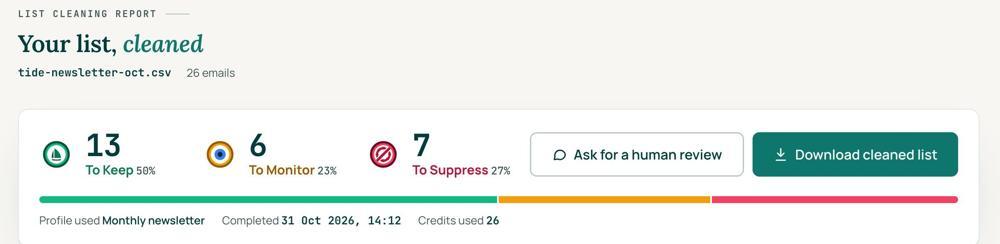 To KeepSend to it.To MonitorSend carefully and watch what happens.To SuppressStop sending to it, and keep the record of who you stopped emailing.
Your first 1,000 are free
Create an account and your first 1,000 addresses are free. No card is needed to sign up. After that you pay for the size of your list, from $0.0080 an address down to $0.0026 at volume, with an $8 minimum. There is no subscription and no monthly minimum.
Human Review
If you want a person to look, ask for a Human Review from your report, and Yanna-Torry goes through your list herself.
Your next step. If your bounces are rows 1, 2 or 8, the list is the problem. Upload it and clean your first 1,000 addresses free at reviewmyemails.com/get-started, so the dead addresses are suppressed before the next send. If they are rows 5 or 6, the list is not the problem, and cleaning will not fix it. Check your records with our free SPF checker and DMARC checker, run the free blocklist check, or ask the free SOS line at reviewmyemails.com/sos.
List cleaning does not fix SPF, DMARC, MX or blocklist problems. Those live in your sending setup, and they are a different job. A blocklist listing measures your sending, so it is never a reason to suppress anyone on your list. And nobody can promise you the inbox, so we do not.
Yanna-Torry Aspraki, Review My Emails
Email SOS Hotline, free
For those problems there is the Email SOS Hotline, our free help line. Tell Yanna-Torry what is going on and she will tell you what she would do. She reads every message herself and replies within 48 to 72 hours, with no pitch.
Ask the free SOS line5.1.1, that says what failed Trust beats tactics™
Founded in 2020, based in Bolton, United Kingdom.
reviewmyemails.com/resources/bounce-codes-decoded?c=web-p10-r06pdf · v1.1
Spotted something out of date?