
Client list at intake
Example Import it
 Hold the import
 Do not import it
The reasoning, in plain English
Do this first
Draft for review. Free 6-step checklist and PDF
For: agencies and freelancers who take over a client's email list. Run it with every new client, before a single address goes into your email marketing tool.

The 60-second answer
This guide is about email, not legal advice. Email law is complex and varies by country. If you are unsure about your own setup, talk to someone who practises email law where you send.
Ask where every address came from. The source predicts complaint rate, bounce rate, engagement and legal exposure before the first send.
Ask for the proof. Who opted in, when, from where and what they agreed to. Without that record, nobody can show there was permission to email them.
Consent does not come with the list. Under GDPR and Canada's CASL, consent is not transferable, so a bought list or one that came with a merger is not your client's to mail as it stands.
Every explanation on this page comes from the Email Almanac, our own library of more than 4,000 answers about email. You do not have to buy anything to read it.
Which case are you?
Two quick picks: where most of the list came from, and whether the client can show an opt-in record. The card shows what to do with the import first.
Answer here and your row lights up, with what to do first. The PDF has every row and the full guide.
Client list at intake
ExampleImport itHold the importDo not import itThe reasoning, in plain English
Do this first
The guide
One line each. Tick them as you go. Open a step for the full explanation.
Why:the source is one of the strongest predictors of what happens when you send.
Where an address came from is one of the strongest predictors of what happens when you send to it. A person who signed up on the client's own form chose to hear from them. A bought, rented, scraped or co-registration list never gave permission for this client's emails. Ask the client to name each source, and roughly how much of the list each one is.
Why:with it you can compare bounces, complaints, clicks and unsubscribes by source.
Every subscriber should carry a source value from the moment they sign up, in a field such as signup_source, filled from the UTM tags on the sign-up link. With it you can compare bounces, complaints, clicks and unsubscribes by source. Without it, a spike cannot be traced to the source behind it, and that cannot be rebuilt later. Make sure the tag is not lost on import.
Why:who opted in, when, from where and what they agreed to.
Proof of consent shows who opted in, when, from where and what they agreed to. At minimum: the address, the sign-up time with its timezone, the IP address, the form or page, the exact consent wording they saw with the privacy policy version, and the box they ticked themselves. With double opt-in, the confirmation click too. "They're on the list" is not proof.
Why:under GDPR and Canada's CASL, consent is not transferable.
Under GDPR and Canada's CASL, consent is not transferable or inheritable. Permission given to one company does not move to another, however the list changed hands. People on a bought list never agreed to hear from your client at all. After a merger or a takeover, the safe path is a re-consent email from the original sender's domain. Say who owns the list now and what changes, and ask each person to opt in again.
Why:check every upload against it, so nobody who left is added back.
Before anything is imported, ask the client to export their unsubscribes, hard bounces and complaints, each as its own file. Check every upload against that record before anything is sent, so nobody who left is added back. Import it wrongly and you start emailing people who unsubscribed or bounced.
Why:the source decides how much cleaning a list needs.
Clean it with Review My Emails, first 1,000 free
The source decides how much cleaning a list needs. A fresh opt-in list from the past six months needs little. A list that has sat idle for two years needs a full validation pass before a single email goes out. Cleaning comes after steps 1 to 5, never instead of them.
Your plan
What your answers mean
| Your client's list | Do this first |
|---|---|
| Bought, rented or scraped | Do not import it. These people never agreed to hear from your client, and consent does not pass with a sale |
| It came with a company they bought or merged with | Hold the import. Send a re-consent email from the original sender's domain, and bring in only the people who opt in again |
| No opt-in record | Hold the import until the client can show who opted in, when, from where and what they agreed to |
| Nobody knows where it came from | Find out first. The source predicts complaints, bounces and legal exposure before the first send |
| An opt-in record for some of the addresses | Split the list by source. Bring in the part with a record, and hold the rest until the client finds its proof |
| The client's own forms, with a record for every address | Import it. Bring the do-not-email record over first, then clean before the first send |
Worked example. Hedda Line runs client newsletters, and Seaglass Ceramics sends her its newsletter-q3.csv. Most of it came from the shop's own sign-up form, but nobody can say where one block of addresses came from. The form addresses carry a source tag and an opt-in record, the other block has neither. Hedda brings in only the form addresses, with the shop's do-not-email record loaded first. She uploads them to Review My Emails, and every address comes back To Keep, To Monitor or To Suppress, with the reason in plain English. The other block stays out until the shop finds its proof.
Review My Emails
You sign up, upload your list and get every address back with one decision and the reason, in plain English. Big lists take a while, so we email you when yours is ready.
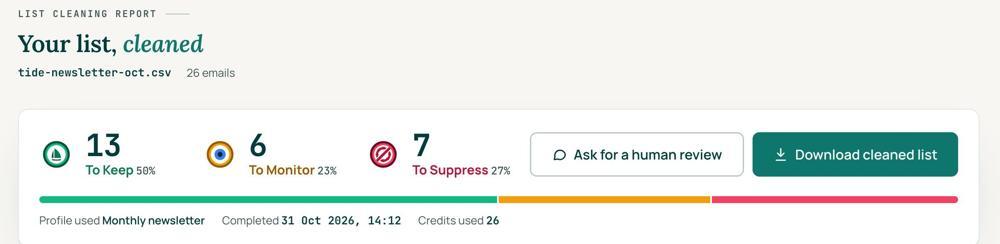 To KeepSend to it.To MonitorSend carefully and watch what happens.To SuppressStop sending to it, and keep the record of who you stopped emailing.
Your first 1,000 are free
Create an account and your first 1,000 addresses are free. No card is needed to sign up. After that you pay for the size of your list, from $0.0080 an address down to $0.0026 at volume, with an $8 minimum. There is no subscription and no monthly minimum.
Human Review
If you want a person to look, ask for a Human Review from your report, and Yanna-Torry goes through your list herself.
Your next step. Run the intake check with every new client before anything is imported. Then upload the list and clean your first 1,000 addresses free at reviewmyemails.com/get-started. Not sure about a client's list? Ask the free SOS line.
List cleaning does not fix SPF, DMARC, MX or blocklist problems. Those live in your sending setup, and they are a different job. A blocklist listing measures your sending, so it is never a reason to suppress anyone on your list. And nobody can promise you the inbox, so we do not.
Yanna-Torry Aspraki, Review My Emails
Email SOS Hotline, free
For those problems there is the Email SOS Hotline, our free help line. Tell Yanna-Torry what is going on and she will tell you what she would do. She reads every message herself and replies within 48 to 72 hours, with no pitch.
Ask the free SOS line Trust beats tactics™
Founded in 2020, based in Bolton, United Kingdom.
reviewmyemails.com/resources/client-list-intake-checklist?c=web-p10-i057pdf · v0.1 draft
Spotted something out of date?