
List under review
ExampleAbout 30 days
60 to 90 days
6 months or more
No line set
The reasoning, in plain English
Do this first
Free guide and PDF
For: anyone who still sends to their list and suspects it looks bigger than its audience. The open rate says most people read you, the clicks say otherwise, and you are not sure who is really there.
The 60-second answer
"Quiet" depends on how often you send. About 30 days with no engagement for daily senders, 60 to 90 days for weekly, and at least six months for monthly.
Read opens and clicks together. Since 2021, Apple's Mail Privacy Protection has filled open counts with machine opens, so an open alone can mislead. A click in the last 90 days is the clearest sign a real person is there. If your links carry UTM tags, Google Analytics also shows which of your emails brought people to your site.
The quiet ones cost you the people still reading. Mailbox providers judge engagement across everything you send, so a large silent share changes how your mail is treated for your readers too.
Every explanation on this page comes from the Email Almanac, our own library of more than 4,000 answers about email. You do not have to buy anything to read it.
Which case are you?
Two quick picks set your quiet line: how long someone can stay silent before they count as quiet, and what to do about them.
Answer here and your row lights up, with what to do first. The PDF has every row and the full guide.
List under review
ExampleThe reasoning, in plain English
Do this first
The guide
One line each. Tick them as you go. Open a step for the full explanation.
Why:write the line down and use the same one every time.
Find it in the table below. Then write the line down and use the same one every time, because a line that shifts each time you look is no line at all. If you change how often you send, move the line with it and give people time to catch up.
Why:clicks come first. An open with no click over six months or more is a weak sign.
Clicks come first. Purchases from an email, site visits from an email link, logins and preference changes count too. An open with no click over six months or more is a weak sign, so do not count that person as active on opens alone. Watch for clicks no person made. Company mail filters check links by clicking them, and on work lists these scanner clicks can be a large part of your reported clicks. How much depends on who you send to. The signs are clicks within seconds of delivery and clusters of clicks from the same IP address.
Why:tools count opens and time windows differently. Set your own line from your own opens and clicks.
Tools count opens and time windows differently, so the same person can read as active in one tool and quiet in another. Set your own line from your own clicks.
Why:a list can pass every address check and still be full of people who stopped reading.
Check them with Review My Emails, first 1,000 free
Checking an address answers "can it receive mail". Watching engagement answers "does a person want it". A list can pass every address check and still be full of people who stopped reading long ago, so you need both. A valid address can still be a poor send.
Why:then treat each group differently.
A simple start: clicked in the last 90 days is active, opened but did not click is warm, nothing at all in 90 days is cold. Then treat each group differently. Your most engaged get your full pace, the middle group a lighter pace or a different mix, and the cold group goes to step 6.
Why:most quiet addresses start to become risky around 90 to 180 days.
Plan it before people pass 90 days with no open or click. Most quiet addresses start to become risky around 90 to 180 days, and the risk climbs sharply past twelve months. Move them to a slower track with your strongest content first. Then send a short, honest stay-or-go email with a clear "keep me subscribed" button and a quieter way out. Suppress anyone still silent 30 to 60 days later. For most senders, suppressing is safer than deleting.
Why:a click on the stay-or-go email is the clearest yes.
A click on the stay-or-go email is the clearest yes. The real question is whether they stay active over the next 30 to 60 days. Someone who only shows opens is not confidently back.
Your plan
What your answers mean
| How often you send | Someone is quiet after | Do this first |
|---|---|---|
| Every day | About 30 days with no engagement | Move anyone past 30 days to a slower track now, because a daily pace can overwhelm the half-interested. Send the stay-or-go email, then suppress anyone still silent 30 to 60 days later |
| Every week | 60 to 90 days with no engagement | Move them to a slower track with your strongest content, send the stay-or-go email, then suppress anyone still silent 30 to 60 days later |
| Every month | At least six months with no engagement. Missing two newsletters is not quiet | Wait for the full window, then the stay-or-go email. A monthly sender to work addresses can give a longer window before suppressing |
| Less often than monthly | The Almanac sets no line this long. Treat it as a list you have not emailed in months | Clean it every six to twelve months, and before any send to a list that has sat more than six months. Then follow our checklist Before you email a list you have not emailed in months |
| About to send more often | Your quiet line gets shorter as you send more | Run a stay-or-go pass first and stop mailing the clearly gone before you raise the pace |
Worked example. Morwenna Deep writes the weekly newsletter for Anchor & Oar Books. newsletter-q3.csv holds 8,000 addresses, and the email marketing tool calls 6,500 of them active, mostly on opens. Morwenna sets the quiet line at 90 days, the top of the weekly range, and reads opens and clicks together. 3,000 people clicked in the last 90 days, 2,000 opened without clicking, and 3,000 did nothing at all. Morwenna uploads the file to Review My Emails. Every address comes back To Keep, To Monitor or To Suppress, with the reason in plain English. Nobody marked To Suppress gets mailed. The 3,000 who clicked keep the weekly email. The 2,000 who only opened get a lighter pace. The 3,000 silent ones move to a slower track with the strongest content, then get the stay-or-go email, and whoever is still silent 60 days later is suppressed.
Review My Emails
You sign up, upload your list and get every address back with one decision and the reason, in plain English. Big lists take a while, so we email you when yours is ready.
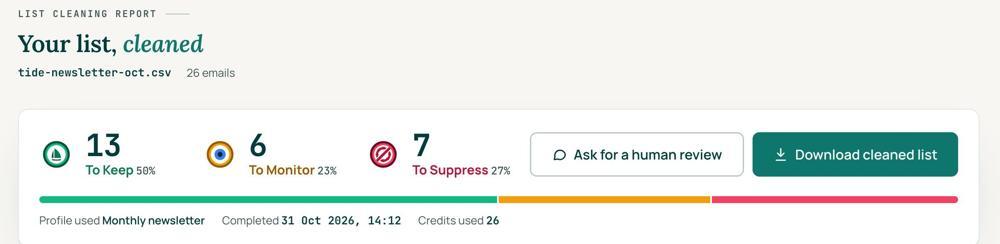
 To KeepSend to it.
 To MonitorSend carefully and watch what happens.
 To SuppressStop sending to it, and keep the record of who you stopped emailing.
Your first 1,000 are free
Create an account and your first 1,000 addresses are free. No card is needed to sign up. After that you pay for the size of your list, from $0.0080 an address down to $0.0026 at volume, with an $8 minimum. There is no subscription and no monthly minimum.
Human Review
If you want a person to look, ask for a Human Review from your report, and Yanna-Torry goes through your list herself.
Your next step. Upload the list and clean your first 1,000 addresses free at reviewmyemails.com/get-started. Every address comes back To Keep, To Monitor or To Suppress, with the reason in plain English. If your problem is a blocklist, SPF, DKIM or DMARC, cleaning will not fix it. Ask the free SOS line instead.
List cleaning does not fix SPF, DMARC, MX or blocklist problems. Those live in your sending setup, and they are a different job. A blocklist listing measures your sending, so it is never a reason to suppress anyone on your list. And nobody can promise you the inbox, so we do not.
Yanna-Torry Aspraki, Review My Emails
Email SOS Hotline, free
For those problems there is the Email SOS Hotline, our free help line. Tell Yanna-Torry what is going on and she will tell you what she would do. She reads every message herself and replies within 48 to 72 hours, with no pitch.
Ask the free SOS line Trust beats tactics™
Founded in 2020, based in Bolton, United Kingdom.
reviewmyemails.com/resources/who-is-still-listening?c=web-p10-r04pdf · v1
Spotted something out of date?