
Old list under review
Example Keep them
 Send less often
 Re-engage, then suppress
The reasoning, in plain English
Do this first
Free 6-step checklist and PDF
For: anyone with readers in the EU or the UK and a list that has grown for years. Old sign-ups, fields nobody uses, people who went quiet long ago.
The 60-second answer
This guide is about email, not legal advice. Email law is complex and varies by country. If you are unsure about your own setup, talk to someone who practises email law where you send.
Bad addresses come off. Under GDPR's accuracy rule, an address you know is invalid, such as a hard bounce, a syntax error or a dead domain, comes off the list you mail once you know.
Silence has a limit. No law sets a fixed expiry date, but you keep personal data only while you have a legitimate purpose. Senders under GDPR commonly stop at 12 to 24 months of silence.
The do-not-email record stays. Delete what you must, but keep a small record of who left, for as long as you send, so nobody who left is mailed again.
Every explanation on this page comes from the Email Almanac, our own library of more than 4,000 answers about email. You do not have to buy anything to read it.
Which case are you?
Two quick picks: how long your quietest group has been silent, and whether you keep your own do-not-email record. The card shows who you may keep, and what to do first.
Answer here and your row lights up, with what to do first. The PDF has every row and the full guide.
Old list under review
ExampleKeep themSend less oftenRe-engage, then suppressThe reasoning, in plain English
Do this first
The guide
One line each. Tick them as you go. Open a step for the full explanation.
Why:GDPR's accuracy rule: hard bounces, syntax errors and dead domains come off once you know.
Find them with Review My Emails, first 1,000 free
GDPR's accuracy rule says personal data must be accurate and kept up to date. Hard bounces, syntax errors and dead domains are invalid, and once you know, they come off the list you mail. Your email marketing tool stops most hard bounces by itself, so check that its suppression list is really kept. Not sure which addresses are still good? A validation pass is a reasonable first step before you decide what to delete.
Why:keep only what you use to send or to segment.
Data minimization means you collect and keep only what you use to send or to segment. Ask for the email address plus the one or two fields tied to the segments you use today, not a phone number, a home address or an income held for some later idea.
Why:no law sets a fixed expiry date. Senders under GDPR use 12 to 24 months, some six.
No law sets a fixed expiry date. GDPR's storage limitation rule says you keep personal data only while there is a legitimate purpose. In practice, senders under GDPR use 12 to 24 months with no activity as their limit, and some go as tight as six months. CAN-SPAM in the US sets no limit at all.
Why:anyone who does not confirm is suppressed, not deleted.
Before you take anyone off, send one or two emails asking if they still want to hear from you. Make it easy to say yes, and easy to leave. Anyone who does not confirm is suppressed, not deleted, because the suppression record has a compliance job to do.
Why:GDPR lets you keep a suppression record so you can honour the opt-out.
Suppression keeps a small record, often hashed, so an address is blocked from every future send. Deletion removes everything. An erasure request under GDPR generally means deletion, but GDPR lets you keep a suppression record so you can honour the opt-out. Deleting a contact in your email tool can delete its unsubscribe or bounce status with it, so a re-upload, an import or a sign-up form can mail that person again. Export your do-not-email record before any delete.
Why:keep only the address, the date and how they left.
GDPR gives two grounds for keeping it. A legal obligation, because the law says you must honour opt-outs. And a legitimate interest, because the record stops someone being added back through a form, an import or a sync. Keep only the address, the date and how they left, and keep it for as long as you send. Then write your limits down. A line such as "re-engagement email at 12 months, silent ones suppressed at 14 months" is a policy you can explain. "We never got around to it" is not.
Your plan
What your answers mean
| Your list | Do this first |
|---|---|
| No do-not-email record of your own, or not sure | Export your unsubscribes, hard bounces and complaints, each as its own file, before you clean or delete anything |
| Quietest group silent a year or more | Send the re-engagement email now. Suppress whoever does not answer, and write down when and why |
| Quietest group silent six to twelve months | Flag them as unengaged, and send to them less often or leave them out of broadcasts |
| Quietest group silent under six months, and a record kept | Keep them. Take off known bad addresses as you find them, and write your limit down |
| Someone asks to be erased | Delete their data and keep only the address on your suppression list, so a later sign-up does not restart sending |
Worked example. Gil Brinewater runs Brinewater Brewing and opens newsletter-q3.csv: 18,000 addresses collected since the taproom opened, a birthday field nobody uses, and readers across the EU. He exports his unsubscribes, bounces and complaints first. He uploads the list to Review My Emails, and every address comes back To Keep, To Monitor or To Suppress, with the reason in plain English. He suppresses the ones marked To Suppress, stops asking for birthdays, and sends a re-engagement email to everyone silent for a year or more.
Review My Emails
You sign up, upload your list and get every address back with one decision and the reason, in plain English. Big lists take a while, so we email you when yours is ready.
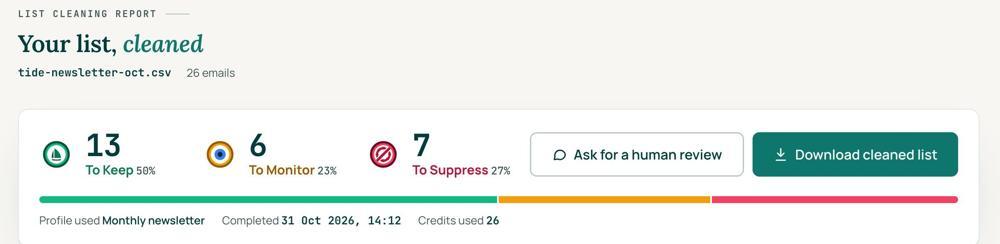 To KeepSend to it.To MonitorSend carefully and watch what happens.To SuppressStop sending to it, and keep the record of who you stopped emailing.
Your first 1,000 are free
Create an account and your first 1,000 addresses are free. No card is needed to sign up. After that you pay for the size of your list, from $0.0080 an address down to $0.0026 at volume, with an $8 minimum. There is no subscription and no monthly minimum.
Human Review
If you want a person to look, ask for a Human Review from your report, and Yanna-Torry goes through your list herself.
Your next step. Find the addresses you know are bad before you decide what to delete. Upload the list and clean your first 1,000 addresses free at reviewmyemails.com/get-started. Export your do-not-email record first. Not sure how your setup handles suppression and re-imports? Ask the free SOS line.
List cleaning does not fix SPF, DMARC, MX or blocklist problems. Those live in your sending setup, and they are a different job. A blocklist listing measures your sending, so it is never a reason to suppress anyone on your list. And nobody can promise you the inbox, so we do not.
Yanna-Torry Aspraki, Review My Emails
Email SOS Hotline, free
For those problems there is the Email SOS Hotline, our free help line. Tell Yanna-Torry what is going on and she will tell you what she would do. She reads every message herself and replies within 48 to 72 hours, with no pitch.
Ask the free SOS line Trust beats tactics™
Founded in 2020, based in Bolton, United Kingdom.
reviewmyemails.com/resources/gdpr-and-your-old-list?c=web-p10-i054pdf · v1
Spotted something out of date?