
List health this month
ExampleOn track
Watch it
Act this month
The reasoning, in plain English
Do this first
Draft for review. Free one-page report and PDF
For: marketing managers, heads of marketing and fractional CMOs who report on email each month. Fill in five numbers from your own email marketing tool, tick what each one says, and send the page up.
The 60-second answer
Five numbers tell you how healthy a list is. Hard bounces, spam complaints, unsubscribes, the engagement trend and the share of the list gone quiet.
The quiet share is the one dashboards leave out. Quiet addresses drag down engagement and add reputation risk every time you send, even when bounces and complaints look fine.
Not every number waits for the monthly report. Complaints and hard bounces can break fast, so they are checked weekly. The engagement trend and the quiet share move slowly, so they are read monthly.
Every explanation on this page comes from the Email Almanac, our own library of more than 4,000 answers about email. You do not have to buy anything to read it.
Which case are you?
Three quick picks: your hard bounce rate, your complaint rate, and how the quiet share is moving. The card shows what to do first, and what to tell your boss.
Answer here and your row lights up, with what to do first. The PDF has every row and the full guide.
List health this month
ExampleThe reasoning, in plain English
Do this first
The guide
One line each. Tick them as you go. Open a step for the full explanation.
Why:keep it under 0.5% per campaign, and total bounces under 2%.
Hard bounces are permanent failures: invalid addresses, dead domains, accounts that no longer exist. Keep them under 0.5% per campaign, and the total bounce rate under 2%. Above 1% hard bounces, the list has a data problem. Suppress hard bounces promptly.
Why:Gmail's threshold for filtering is 0.10%. Check it weekly.
Complaints are how mailbox providers know your subscribers do not want your email. Gmail's threshold for taking filtering action is 0.10%. If the rate is rising, the usual causes are a weak permission model, people who do not remember signing up, or sending too much. This one is checked weekly, not monthly.
Why:under 0.5% per campaign is healthy.
Under 0.5% per campaign is healthy. Consistently above 1% means something is not working: the content, the frequency or who you send to. Unsubscribes are better than complaints, because the subscriber used the right exit.
Why:report the trend, not just the number, and lean on clicks.
Report the trend, not just the number. A slow drift down over months is normal. A sudden drop usually points to a deliverability problem or a content change that did not land. Lean on clicks more than opens, because Apple's Mail Privacy Protection makes many opens machine-generated.
Why:if it grows month over month, that is decay.
Find the quiet ones with Review My Emails, first 1,000 free
Count the addresses with no opens or clicks in 90, 180 and 365 days, and watch the share month over month. If it grows, that is decay. Dashboards rarely show this number. Where your quiet line sits depends on how often you send: 30 days for a daily sender, 60 to 90 days for weekly, at least six months for monthly.
Why:deliverability and marketing numbers belong to different owners.
Deliverability numbers say whether mail can reach the inbox. Marketing numbers say what happens once it is there. They belong to different owners. Complaints and hard bounces go on the weekly check, the engagement trend and the quiet share on the monthly page. Send the page up with one line on what changed since last month.
Your plan
What your numbers mean
| Your numbers | Do this first |
|---|---|
| Complaints at 0.10% or above | Find the cause before the next send: how people joined, whether they remember you, how often you send. Then check complaints every week |
| Hard bounces above 1% a campaign | The list has a data problem. Suppress the hard bounces now, and find the bad addresses before the next send |
| Complaint rate not known | Get it first, and check it every week. A complaint spike missed for a month can get your domain flagged |
| Quiet share growing month over month | That is decay. Send a re-engagement email to the 90 to 180 day group, and suppress those who do not respond |
| Quiet share not counted | Count the addresses with no opens or clicks at 90, 180 and 365 days, and add the share to next month's page |
| Hard bounces between 0.5% and 1% | Above the healthy line. Suppress hard bounces promptly, and watch the number next month |
| All three in line | Report the trend, not just the number, and keep the weekly checks going |
Worked example. Coral Seaforth is the marketing manager at Kelp Street Bakery and fills in the page from last month's sends. Hard bounces are under 0.5% and complaints under 0.10%. The share of the list with no opens or clicks in 90 days has grown every month. That lights "Quiet share growing month over month". She sends the page up with one line: bounces and complaints look fine, the quiet share is the risk, and a re-engagement email goes to the 90 to 180 day group this month. Before that send she uploads the list to Review My Emails, and every address comes back To Keep, To Monitor or To Suppress, with the reason in plain English.
Review My Emails
You sign up, upload your list and get every address back with one decision and the reason, in plain English. Big lists take a while, so we email you when yours is ready.
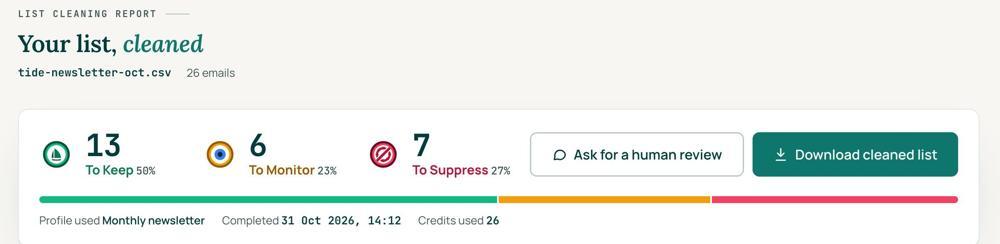
 To KeepSend to it.
 To MonitorSend carefully and watch what happens.
 To SuppressStop sending to it, and keep the record of who you stopped emailing.
Your first 1,000 are free
Create an account and your first 1,000 addresses are free. No card is needed to sign up. After that you pay for the size of your list, from $0.0080 an address down to $0.0026 at volume, with an $8 minimum. There is no subscription and no monthly minimum.
Human Review
If you want a person to look, ask for a Human Review from your report, and Yanna-Torry goes through your list herself.
Your next step. Report the five numbers each month. When the bounces or the quiet share climb, find the addresses behind them: upload the list and clean your first 1,000 addresses free at reviewmyemails.com/get-started. Want to talk the numbers through first? Ask the free SOS line.
List cleaning does not fix SPF, DMARC, MX or blocklist problems. Those live in your sending setup, and they are a different job. A blocklist listing measures your sending, so it is never a reason to suppress anyone on your list. And nobody can promise you the inbox, so we do not.
Yanna-Torry Aspraki, Review My Emails
Email SOS Hotline, free
For those problems there is the Email SOS Hotline, our free help line. Tell Yanna-Torry what is going on and she will tell you what she would do. She reads every message herself and replies within 48 to 72 hours, with no pitch.
Ask the free SOS line Trust beats tactics™
Founded in 2020, based in Bolton, United Kingdom.
reviewmyemails.com/resources/list-health-monthly-report?c=web-p10-i056pdf · draft
Spotted something out of date?