
Tool under review
ExampleStop there
Valid count inflated
Keep it on the shortlist
The reasoning, in plain English
Do this first
Free 6-step test and PDF
For: anyone choosing a tool to check or clean a list, or wondering if the cheap one you already use tells the truth. A shortlist of two or three, a renewal coming up, a result that says almost everything is valid.
The 60-second answer
Test with answers you already know. Build a small file of 50 to 200 addresses where you know the truth, with every kind a tool should handle, and score each tool against it.
Same file, same day. Send the identical file to every tool on the same day, then compare the results kind by kind.
Honest beats high. No tool gets every address right. Judge a tool on how honestly it labels the ones it cannot be sure of, not on its headline accuracy.
Every explanation on this page comes from the Email Almanac, our own library of more than 4,000 answers about email. You do not have to buy anything to read it.
Which case are you?
Run the test in the steps, then answer two questions about what the tool did. The card says whether to keep it on your shortlist.
Answer here and your row lights up, with what to do first. The PDF has every row and the full guide.
Tool under review
ExampleThe reasoning, in plain English
Do this first
The guide
One line each. Tick them as you go. Open a step for the full explanation.
Why:50 to 200 addresses, with every kind a tool should handle.
Aim for 50 to 200 addresses, with every kind a tool should handle: real inboxes you control, addresses you know were never created at real domains, role addresses such as info@ and support@, disposable addresses from a throwaway service, addresses at a catch-all domain, and broken ones such as a missing @ or a double dot.
Why:results shift as domains change, so run them within the same hour if you can.
Run it through Review My Emails too, first 1,000 free
Results shift as domains change, so do not run one tool today and the next one next week. Upload the file to two or three tools within the same hour if you can. Then run a sample of your own list through the same tools, so you see how each one handles your kind of addresses.
Why:disagreement on catch-all is expected. On a clearly valid or invalid address it is a red flag.
For each address, write down what each tool said, whether it matches what you know, and where the tools disagree. Disagreement on catch-all addresses is expected. Disagreement on an address that is clearly valid or clearly invalid is a red flag. On the broken addresses and the inboxes you control, expect every one right. If a tool misses those, stop there.
Why:any one of these is a reason to ask questions.
Any one of these is a reason to ask questions.
Why:no tool gets every address right. An honest tool labels the doubtful ones unknown or risky.
No tool gets every address right. Accuracy drops on catch-all domains, role addresses, company mail servers behind security gateways, and privacy services that forward mail, because those servers do not give honest answers to a check. An honest tool labels them unknown or risky instead of guessing.
Why:free tools stop at two checks, the format and the domain.
Free tools stop at two checks, the format and the domain. A full check also asks the mailbox and flags catch-all, disposable and role addresses. Look for labels beyond valid and invalid, such as risky, unknown, disposable, role and accept-all. What hurts your reputation is what you send to the risky group, so judge each tool on how it handles that group. And your email marketing tool's own import check is a quick filter for broken formats, not a full check. Its bounce handling can misread the codes smaller mail servers send.
Your plan
What your answers mean
| What the tool did | Do this first |
|---|---|
| Got a broken address or an inbox you control wrong | Stop there. Every tool should get these right |
| Marked nothing catch-all or unknown | Treat its valid count as inflated. No check can settle a catch-all domain, so an empty unknown group means the doubtful ones sit inside valid |
| Got the clear ones right and labelled the doubtful ones | Keep it on the shortlist. Choose between the finalists on the labels they give and on what they tell you to do with the risky group |
| Disagreed with another tool on an address you know is valid or invalid | The tool that does not match your answer gets the red flag. Disagreeing on catch-all addresses is normal |
Worked example. Coral Seaforth at Tidewell Supply Co. has two tools on her shortlist and a renewal next month. She builds tool-test.csv: 120 addresses, from her own team's inboxes to a few with a missing @. On the same morning she uploads it to both tools and to Review My Emails, where the first 1,000 addresses are free. One tool marks every address valid or invalid, with nothing unknown, so she treats its valid count as inflated. At Review My Emails every address comes back To Keep, To Monitor or To Suppress, with the reason in plain English. She scores the other two on the same sheet and picks on what each one tells her to do with the risky group.
Review My Emails
You sign up, upload your list and get every address back with one decision and the reason, in plain English. Big lists take a while, so we email you when yours is ready.
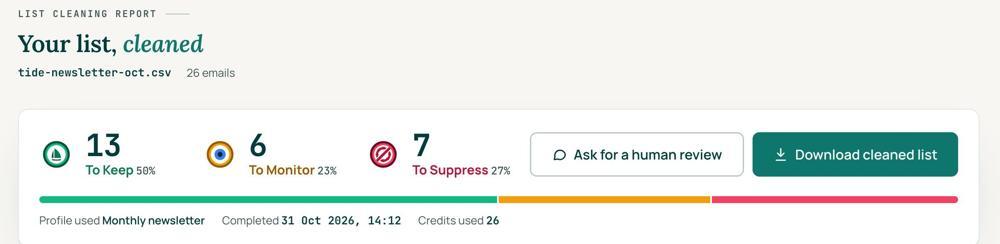
 To KeepSend to it.
 To MonitorSend carefully and watch what happens.
 To SuppressStop sending to it, and keep the record of who you stopped emailing.
Your first 1,000 are free
Create an account and your first 1,000 addresses are free. No card is needed to sign up. After that you pay for the size of your list, from $0.0080 an address down to $0.0026 at volume, with an $8 minimum. There is no subscription and no monthly minimum.
Human Review
If you want a person to look, ask for a Human Review from your report, and Yanna-Torry goes through your list herself.
Your next step. Run the same test file through Review My Emails. Your first 1,000 addresses are free at reviewmyemails.com/get-started. Want a second opinion on a tool you already use? Ask the free SOS line. If your problem is a blocklist, SPF, DKIM or DMARC, cleaning will not fix it, and the SOS line is the place for that too.
List cleaning does not fix SPF, DMARC, MX or blocklist problems. Those live in your sending setup, and they are a different job. A blocklist listing measures your sending, so it is never a reason to suppress anyone on your list. And nobody can promise you the inbox, so we do not.
Yanna-Torry Aspraki, Review My Emails
Email SOS Hotline, free
For those problems there is the Email SOS Hotline, our free help line. Tell Yanna-Torry what is going on and she will tell you what she would do. She reads every message herself and replies within 48 to 72 hours, with no pitch.
Ask the free SOS line Trust beats tactics™
Founded in 2020, based in Bolton, United Kingdom.
reviewmyemails.com/resources/test-an-email-validation-tool?c=web-p10-i053pdf · v1
Spotted something out of date?