
Import under review
Example Ready to import
 Check it first
 Hold the import
The reasoning, in plain English
Do this first
Draft for review. Free 6-step checklist and PDF
For: shops and small teams about to import a list into their email marketing tool, who think the tool already checks it. A new file, a move from another tool, or old contacts coming back.
The 60-second answer
Your email marketing tool is not a list check. Some tools check addresses on import, some only at the sign-up form, some only through an add-on.
Bounce handling comes after the send. The tool suppresses an address once it bounces, and it can misread codes from smaller mail servers.
The check belongs before the import. Validate the list, and bring your do-not-email record over before anything goes in.
Every explanation on this page comes from the Email Almanac, our own library of more than 4,000 answers about email. You do not have to buy anything to read it.
Which case are you?
Two quick picks: where your email marketing tool checks addresses, and whether you have the do-not-email record for this list. The card shows what to do before the import.
Answer here and your row lights up, with what to do first. The PDF has every row and the full guide.
Import under review
ExampleReady to importCheck it firstHold the importThe reasoning, in plain English
Do this first
The guide
One line each. Tick them as you go. Open a step for the full explanation.
Why:before the import, on the import, or at the sign-up form.
An address can be checked before the import, on the import, or at the sign-up form. A batch check before the import suits a list that does not grow fast. An import-time check runs when you upload a list to the tool. A check at the form stops typos and throwaway addresses before they reach the list.
Why:a built-in connection does only what its two makers chose to build.
Some email marketing tools check addresses against a validation service on import, some need an add-on or a middleware layer, and a built-in connection does only what its two makers chose to build. Read your tool's import settings and help pages, and write down what it checks. Ask for documentation, and test it before you rely on it.
Why:by the time an address bounces, the email has gone.
Your tool suppresses an address after it hard bounces. That is useful, but by then the email has gone. Bounce codes are not standardized, so a code from a small or private mail server can be filed as soft when that server will never accept the mail. Read the raw code, not only the label.
Why:a re-imported address can be treated as new and mailed again.
Deleting a contact can delete the record that says do not email. If the same address comes back in an import, the tool may treat it as new and mail it again. Export your unsubscribes, hard bounces and complaints first, and check every import against them.
Why:sending again to addresses that bounced is treated as careless or as bad faith.
Your tool watches your bounce rate, because on a shared IP one sender's bad list hurts the senders next to it. Sending again to addresses that already hard bounced is treated as careless or as bad faith.
Why:validate before you import it, not after the bounces start.
Check it with Review My Emails, first 1,000 free
Validate the list before you import it, not after the bounces start. Checking a list before a send is the fastest way to bring a high bounce rate down. Then import, with the do-not-email record loaded first.
Your plan
What your answers mean
| Your import | Do this first |
|---|---|
| No do-not-email record for this list, or not sure | Get it before you import. A re-upload can mail people who already left |
| Your tool only learns from bounces | Check the list before you import it. A bounce means the email already went |
| Not sure what your tool checks | Read its import settings and help pages, and check the list yourself before the import |
| Checked at the sign-up form only | New sign-ups are covered, an imported file is not. Check the file before it goes in |
| Checked on import, with your do-not-email record | Write down what that check covers, import with the record loaded first, and read the raw bounce codes after the first send |
Worked example. Skipper Mako runs Barnacle & Bloom and is moving black-friday-list.xlsx into a new email marketing tool. The tool checks new sign-ups at the form, but says nothing about an imported file. He exports his unsubscribes, hard bounces and complaints from the old tool first. He uploads the file to Review My Emails, and every address comes back To Keep, To Monitor or To Suppress, with the reason in plain English. He leaves out the ones marked To Suppress and imports the rest, with the do-not-email record loaded first.
Review My Emails
You sign up, upload your list and get every address back with one decision and the reason, in plain English. Big lists take a while, so we email you when yours is ready.
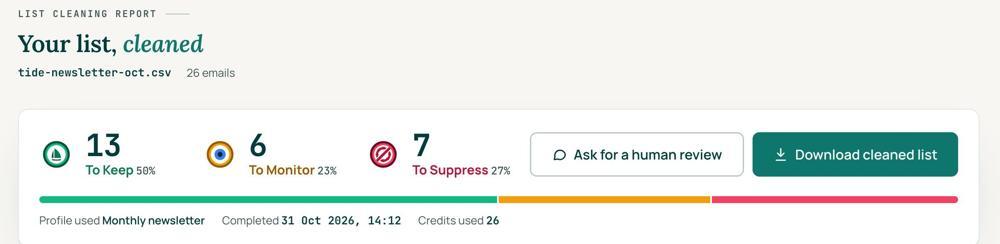 To KeepSend to it.To MonitorSend carefully and watch what happens.To SuppressStop sending to it, and keep the record of who you stopped emailing.
Your first 1,000 are free
Create an account and your first 1,000 addresses are free. No card is needed to sign up. After that you pay for the size of your list, from $0.0080 an address down to $0.0026 at volume, with an $8 minimum. There is no subscription and no monthly minimum.
Human Review
If you want a person to look, ask for a Human Review from your report, and Yanna-Torry goes through your list herself.
Your next step. Check the list before it goes into your email marketing tool. Upload it and clean your first 1,000 addresses free at reviewmyemails.com/get-started. Export your do-not-email record first. Not sure what your tool already checks? Ask the free SOS line.
List cleaning does not fix SPF, DMARC, MX or blocklist problems. Those live in your sending setup, and they are a different job. A blocklist listing measures your sending, so it is never a reason to suppress anyone on your list. And nobody can promise you the inbox, so we do not.
Yanna-Torry Aspraki, Review My Emails
Email SOS Hotline, free
For those problems there is the Email SOS Hotline, our free help line. Tell Yanna-Torry what is going on and she will tell you what she would do. She reads every message herself and replies within 48 to 72 hours, with no pitch.
Ask the free SOS line Trust beats tactics™
Founded in 2020, based in Bolton, United Kingdom.
reviewmyemails.com/resources/what-your-email-tool-checks-on-import?c=web-p10-i055pdf · draft
Spotted something out of date?