
List under review
ExampleSend as normal
Clean before you send
Clean first, then stay-or-go
Stop and clean
The reasoning, in plain English
Do this first
Free 6-step checklist and PDF
For: anyone about to send to a list that has sat quiet for six months or more. An old newsletter, last year's Black Friday list, a list from a tool you left.
The 60-second answer
Lists go stale on their own. A typical mixed list loses 12 to 20 percent a year, and lists of work addresses go faster, 25 to 30 percent a year.
Clean before you send. If a list has sat for more than six months, clean it before the next send, whatever your normal schedule is.
Wake it gently. Ask the quiet people to stay or go first, then stop mailing the ones who stay silent.
Every explanation on this page comes from the Email Almanac, our own library of more than 4,000 answers about email. You do not have to buy anything to read it.
Which case are you?
About to send to a list that has sat quiet for 6 months or more? Two quick picks light up what to do first.
Answer here and your row lights up, with what to do first. The PDF has every row and the full guide.
List under review
ExampleThe reasoning, in plain English
Do this first
The guide
One line each. Tick them as you go. Open a step for the full explanation.
Why:opens alone can mislead. Apple's Mail Privacy Protection adds machine opens, so read opens and clicks together.
When did you last send to it, and when did each person last open or click? Read the two together. Apple's Mail Privacy Protection fills open counts with machine opens, so an open alone can mislead, and a click shows a real person. If your links carry UTM tags, Google Analytics also shows which of your emails brought people to your site. Keep these dates, because step 4 uses them. What "inactive" means depends on how often you send: about 30 days for daily senders, 60 to 90 days for weekly, at least six months for monthly.
Why:a typical mixed list loses 12 to 20% a year. Of 10,000, about 8,000 to 8,800 are still valid and engaged after 12 months.
Expect part of it to be gone.
Decay comes in two kinds. Hard decay is an address that no longer exists and bounces. Soft decay is a real inbox where nobody reads you any more, and it never bounces. A typical mixed list of 10,000 holds about 8,000 to 8,800 valid, engaged addresses after twelve months.
Why:a valid address can still be a poor send.
Check them with Review My Emails, first 1,000 free
A validator answers "does this mailbox exist". Cleaning answers "should I send to it". A valid address can still be a poor send. Watch for three kinds: catch-all domains accept any address, so "accepted" is not "valid". Role addresses such as info@ are read by several people, and the one reading today may never have signed up. Most disposable addresses stop taking mail within a day, so the next email bounces.
Why:whoever answers stays. Best before a big seasonal send such as Black Friday.
Keep it short and honest about why you are writing. Remind them what they signed up for. Give a clear "keep me subscribed" button and a quieter way out. The usual trigger is 90 to 180 days with no open or click, and the best time is before a big seasonal send such as Black Friday.
Why:some email marketing tools suspend accounts that stay above 2%.
Keep total bounces under 2 percent and hard bounces under 0.5 percent. Some email marketing tools suspend accounts that stay above 2 percent. Stop sending to a hard bounce at once, and to an address that soft bounces again and again.
Why:suppressing keeps the record for compliance and history.
Stop first, then suppress.
Whoever answers stays. In your email tool, put everyone who ignored the stay-or-go email on the do-not-send list (some tools call it suppression). No do-not-send list in your tool? Tag them so you know who they are, archive them, or put them in a segment you leave out of every send. For most senders, suppressing is safer than deleting, because the record stays for compliance and history.
Your plan
What your answers mean
| Your list | Do this first |
|---|---|
| Last sent under six months ago, bounces under 2 percent last time | Send as normal and keep your usual cleaning schedule |
| Last sent six to twelve months ago | Clean before you send, then the stay-or-go email to anyone with no open or click in 90 to 180 days |
| Last sent a year ago or more | Clean first, then send the stay-or-go email before any other mail. The risk climbs sharply past twelve months |
| Last send bounced over 2 percent | Stop and clean before anything else |
Worked example. Delphi at Inkwell & Tide finds black-friday-list.xlsx: 10,000 addresses, last mailed a year ago. The Almanac's decay range for a mixed list says 1,200 to 2,000 of them may have gone stale. She uploads the file to Review My Emails. Every address comes back To Keep, To Monitor or To Suppress, with the reason in plain English. She mails nobody marked To Suppress, sends the stay-or-go email before the sale, and watches the first send's bounces against the 2 percent line.
Review My Emails
You sign up, upload your list and get every address back with one decision and the reason, in plain English. Big lists take a while, so we email you when yours is ready.
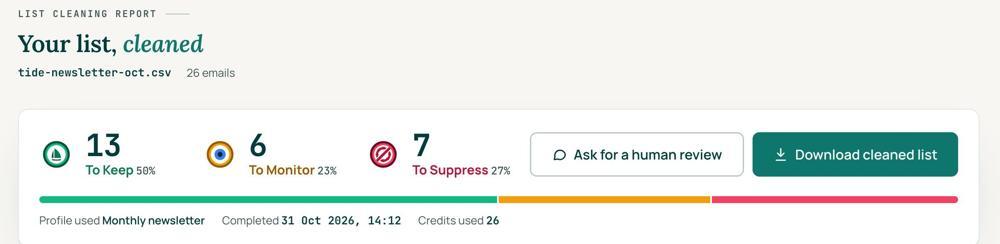
 To KeepSend to it.
 To MonitorSend carefully and watch what happens.
 To SuppressStop sending to it, and keep the record of who you stopped emailing.
Your first 1,000 are free
Create an account and your first 1,000 addresses are free. No card is needed to sign up. After that you pay for the size of your list, from $0.0080 an address down to $0.0026 at volume, with an $8 minimum. There is no subscription and no monthly minimum.
Human Review
If you want a person to look, ask for a Human Review from your report, and Yanna-Torry goes through your list herself.
Your next step. Upload the list and clean your first 1,000 addresses free at reviewmyemails.com/get-started. If your problem is a blocklist, SPF, DKIM or DMARC, cleaning will not fix it. Ask the free SOS line instead.
List cleaning does not fix SPF, DMARC, MX or blocklist problems. Those live in your sending setup, and they are a different job. A blocklist listing measures your sending, so it is never a reason to suppress anyone on your list. And nobody can promise you the inbox, so we do not.
Yanna-Torry Aspraki, Review My Emails
Email SOS Hotline, free
For those problems there is the Email SOS Hotline, our free help line. Tell Yanna-Torry what is going on and she will tell you what she would do. She reads every message herself and replies within 48 to 72 hours, with no pitch.
Ask the free SOS line Trust beats tactics™
Founded in 2020, based in Bolton, United Kingdom.
reviewmyemails.com/resources/before-you-email-an-old-list?c=web-p10-r01pdf · v1
Spotted something out of date?