
Free 7-step checklist and PDF
Switching email platforms without moving the mess
For: anyone moving from one email marketing tool to another. A better price, a feature you need, or a hope that a fresh start will get you out of the spam folder.
- The seven checks, open on this page, no sign-up needed to read them.
- Tick each step as you go. Your ticks stay in this browser.
- Your ticks and your row as a PDF, with room for notes.
The 60-second answer
A new platform does not leave your problems behind. Your domain's reputation, your list, your complaints and the record mailbox providers keep of how people engage with your mail all move with you. Fix the cause first, then move.
Your domain's reputation travels, your sending IPs' does not. New IPs start with no history, so build up slowly over several weeks, starting with the people who engage most.
The never-mail list moves first. Hard bounces, unsubscribes and complaints do not transfer on their own. Import them before the first send from the new tool.
Every explanation on this page comes from the Email Almanac, our own library of more than 4,000 answers about email. You do not have to buy anything to read it.
- You get one email.It comes from Review My Emails, with the PDF link inside.
- Your PDF opens with your ticks.Every step you ticked is marked on it.
- Nothing else, unless you ask.No newsletter unless you tick the box. Unsubscribe in one click, any time.
The guide
The move, in seven steps
One line each. Tick them as you go. Open a step for the full explanation.
- 1
Why:spam folder trouble usually is not a reason. The same list, content and pace bring the same results.
Read the full explanation
A platform with real infrastructure trouble, or a feature you need, is a fair reason to switch. Spam folder trouble usually is not. The same list, content and pace bring the same results on the new platform after a short honeymoon. If deliverability is the reason, find the cause before you move.
- 2
Why:then choose: one platform, or marketing and transactional mail on separate ones.
Read the full explanation
List your sending domains, your SPF, DKIM and DMARC records, tracking domains, never-mail lists, automations, templates and connections to other tools. Then choose: everything on one platform, or marketing mail and transactional mail (receipts, password resets) on separate ones, so a complaint spike on a campaign cannot hold up a password reset. For smaller senders, one platform is usually the right call.
- 3
Why:account-wide unsubscribes do not move between tools by themselves.
Read the full explanation
Export hard bounces, unsubscribes and complaints as separate files if you can, keep copies, and import each into the matching place in the new tool. Before the first send, test the never-mail list with a few addresses you know are on it, to check it really works. Account-wide unsubscribes do not move between tools by themselves. An unsubscribe never expires, so keep this list for good.
- 4
Why:exports get messy on the way: broken formatting, mangled domains and duplicates.
Read the full explanation
Exports get messy on the way: broken formatting, mangled domains and duplicates creep in. Do not carry the old tool's "active" group across as it stands, because each tool counts active differently. Check engagement again before you move. Never add old hard bounces back without checking them first.
- 5
Why:add the new tool to your one SPF record, never a second SPF record.
Read the full explanation
A week ahead, lower the TTL on the records you will change to 300 seconds. Add the new DKIM selector next to the old one. Add the new tool to your one SPF record, never a second SPF record. Send a test and check the header for dkim=pass and spf=pass. Expect to rebuild templates and automations by hand. Write down every trigger, condition and delay first, and test every template with a real send.
- 6
Why:for most senders that takes 30 to 60 days. Keep both platforms running for four to eight weeks.
Read the full explanation
Start with your most engaged people at a small share of your usual volume and build up over several weeks. For most senders that takes 30 to 60 days. A clean list matters here, because mailbox providers watch bounces closely while new IPs build up, and a first send with 8 percent bounces gets slowed down. Keep both platforms running for four to eight weeks.
- 7
Why:a complaint rate above 0.1 percent means something is wrong.
Read the full explanation
The warning signs: hard bounces jump, complaints climb (often a never-mail list that did not come across), domain reputation drops in Google Postmaster Tools, or opens slowly start to fall after a first week that looked fine. Check your DMARC reports every day for authentication failures. A complaint rate above 0.1 percent means something is wrong. Cancel the old account only after a final export of your history and never-mail lists. Remove the old DNS records last, and SPF last of all.
See every row of the table
What your ticks mean
| Where you are | Do this first |
|---|---|
| Not sure why you are moving, or moving to escape the spam folder | Find the cause before you move. A new platform keeps the same list, the same reputation and the same complaints |
| Setup not written down | Write down what you have before you change anything. The new tool is easier to set up from a full list than from memory |
| Never-mail list not in the new tool yet | Send nothing from the new tool. Import every hard bounce, unsubscribe and complaint first, and test the list with a few addresses you know are on it |
| List not cleaned since the export | Clean it before the first send, while it is still outside the new tool |
| SPF and DKIM not set up and tested on the new tool | Send nothing yet. Add the new records next to the old ones and test for a pass first |
| Steps 1 to 5 done | Start the build-up: your most engaged people first, small volume, both platforms on |
| Steps 1 to 6 done | Watch the warning signs every day and keep the old account until everything is stable |
| All seven done | Move complete. Keep cleaning on your usual schedule from here |
See how it plays out for a real business
Worked example. Gil Brinewater runs Kelp Street Bakery and is moving to a new email marketing tool for a feature the old one lacks. The list, tide-newsletter-oct.csv, holds 15,000 addresses. From the old tool Gil exports three never-mail files, 900 hard bounces, 1,400 unsubscribes and 60 complaints, imports each into its matching place in the new tool and tests it with a few addresses Gil knows are on it. Gil uploads the 15,000 to Review My Emails. Every address comes back To Keep, To Monitor or To Suppress, with the reason in plain English. Nobody marked To Suppress goes into the new tool. The new DKIM selector and the new SPF include go in next to the old ones, and the test shows dkim=pass and spf=pass. The first sends go to the people who open and click most often, and both tools run side by side for six weeks. Once bounces and complaints hold steady, Gil makes a final export, cancels the old one, then removes the old records, SPF last.
Review My Emails
This card, for every address on your list.
You sign up, upload your list and get every address back with one decision and the reason, in plain English. Big lists take a while, so we email you when yours is ready.
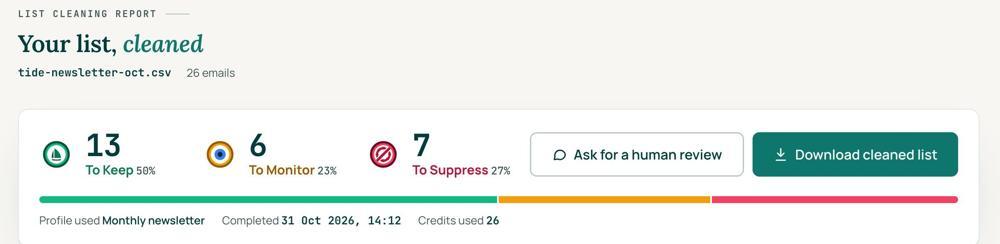
 To KeepSend to it.
 To MonitorSend carefully and watch what happens.
 To SuppressStop sending to it, and keep the record of who you stopped emailing.
Your first 1,000 are free
Create an account and your first 1,000 addresses are free. No card is needed to sign up. After that you pay for the size of your list, from $0.0080 an address down to $0.0026 at volume, with an $8 minimum. There is no subscription and no monthly minimum.
Human Review
If you want a person to look, ask for a Human Review from your report, and Yanna-Torry goes through your list herself.
Your next step. Clean the list before it goes into the new tool. Upload it and clean your first 1,000 addresses free at reviewmyemails.com/get-started. If the reason you are moving is a blocklist, SPF, DKIM or DMARC problem, cleaning will not fix it. A new platform helps only when the platform itself is the cause. Ask the free SOS line, and check your records with our free SPF checker and email header analyzer.
List cleaning does not fix SPF, DMARC, MX or blocklist problems. Those live in your sending setup, and they are a different job. A blocklist listing measures your sending, so it is never a reason to suppress anyone on your list. And nobody can promise you the inbox, so we do not.
Yanna-Torry Aspraki, Review My Emails
Email SOS Hotline, free
Stuck? We are here.
For those problems there is the Email SOS Hotline, our free help line. Tell Yanna-Torry what is going on and she will tell you what she would do. She reads every message herself and replies within 48 to 72 hours, with no pitch.
Ask the free SOS lineWords used
- Never-mail list (suppression list)
- the hard bounces, unsubscribes and complaints you must never mail again
- Domain reputation and IP reputation
- how mailbox providers judge your domain, which moves with you, and your sending servers, which do not
- Build-up (IP warming)
- raising volume on new sending IPs step by step, best readers first, so providers learn to trust them
- DKIM selector
- a short label that tells receiving servers where to find your DKIM key in DNS. A domain can publish several at once, often one for each platform
- TTL
- how long, in seconds, the internet keeps a copy of a DNS record before it checks again
- Split delivery
- marketing mail and transactional mail on separate platforms for good, not only during a move
Where this came from: the Review My Emails Email Almanac. Each question below opens its answer.
- What is a DKIM selector?
- What happens to bounce data over time (aging)?
- How does inactivity measurement differ across ESPs?
- When should I use bulk validation?
- How often should I clean my email list?
- What’s the difference between global vs list-specific unsubscribes?
- How do you migrate from one ESP to another safely?
- How to move sender reputation between ESPs?
- What is IP/domain warming after migration?
- What’s the best way to export/import suppression lists?
- How do you transfer templates, automations, and preferences?
- How long should you keep both ESPs active during transition?
- What’s the difference between full migration and split delivery?
- How to update DNS records during migration?
- What are signs that migration hurt deliverability?
- What is TTL (Time To Live) in DNS?
- Can I fix deliverability by changing ESPs?
- Can I re-add unsubscribed contacts after a while?
- Does switching ESPs fix reputation?
 Trust beats tactics™
Founded in 2020, based in Bolton, United Kingdom.
reviewmyemails.com/resources/switching-email-platform?c=web-p10-r03pdf · v1