
Found list under review
ExampleDo not send
Get their yes first
Check the law first
The reasoning, in plain English
Do this first
Free guide and PDF checklist
For: anyone holding addresses they looked up themselves, from an email finder, a sales database, a company website or a directory, before the first email goes to any of them.
The 60-second answer
You have a list of addresses you found yourself, with a finder tool, a sales database or an afternoon on company websites. Before the first email goes out, this guide sorts out three things in seven checks: whether you may send to them, which addresses are worth sending to, and what never to do with them. It is free and all of it is on this page.
Found is not a yes. A finder tells you an address can take mail, not that the person wants your email or that you may send to it. Checking is hygiene, not strategy.
The law depends on who they are and where they are. Personal addresses in the EU and Canada generally need a yes before the first marketing email. Work addresses have more room in some countries, and a named person at a company sits in a gray zone, safest treated like a personal address.
Check every address before the first send. Found addresses go out of date fast, and mail to people who have never heard from you has no history to soften a bad first send. Keep bounces below 2% of the send.
Every explanation on this page comes from the Email Almanac, our own library of more than 4,000 answers about email. You do not have to buy anything to read it.
Which case are you?
Two quick picks: where the addresses came from, and whose they are. The card shows whether you may send at all, and what to do first.
Answer here and your row lights up, with what to do first. The PDF has every row and the full guide.
Found list under review
ExampleThe reasoning, in plain English
Do this first
The guide
One line each. Tick them as you go. Open a step for the full explanation.
Why:not every source is the same. A finder's data goes out of date quickly.
Not every source is the same.
Why:being public does not make an address legal to email.
Being public does not make an address legal to email. Scraping LinkedIn also breaks its terms, and anyone who buys scraped data takes on the source's problems. People who never asked to hear from you report it as spam far more often, and old profile addresses bounce. A bought list is a "do not send" for the same reason.
Why:the rules follow the reader, and they are not the same for every address.
The rules follow the reader, and they are not the same for every address.
In the EU, writing to someone without their yes needs your own written reason first, and the first email has to say where you got their address. This is not legal advice. Ask a lawyer for the countries you send to.
Why:a check tells you the address can take mail. It cannot tell you the person wants your email.
Check them with Review My Emails, first 1,000 free
A check runs in three stages: the format, the domain, then the mailbox itself. It tells you the address can take mail. It cannot tell you whether the person wants your email or whether you may send to them. And a valid address can still land in spam or bring complaints. Found addresses go stale fast. Work addresses die when people change jobs, and lists of them lose about 25 to 30 percent a year.
Why:catch-all domains accept mail for any address, so a check cannot confirm the mailbox is real.
Why:keep total bounces under 2 percent and hard bounces under 0.5 percent.
Mail to people who have never heard from you has no history to soften a weak send, so mailbox providers judge it on a blank slate. Keep total bounces under 2 percent and hard bounces under 0.5 percent. Remove a hard bounce after the first failure and never retry it. Keep one suppression list and check every new import against it. When someone asks to stop, stop the same day, in every tool you send from.
Why:a reply, a booked call or a webinar seat is not a yes to marketing.
A reply, a booked call or a seat at your webinar is not a yes to marketing. Keep found addresses in their own group. When the time is right, ask directly, for example "We send a weekly newsletter on [topic]. Want in?", and write down when and how they said yes.
Your plan
What your answers mean
| Your addresses | Do this first |
|---|---|
| Bought as a list | Do not send. The people on it never agreed to hear from you, and the seller's promise does not protect you |
| Scraped by a bot from LinkedIn or another site | Do not send. Public is not permission, and scraping breaks the site's terms |
| Personal addresses, like Gmail or Yahoo | Get their yes first. In the EU, Canada and most of the world, a personal address needs it before the first marketing email |
| Named people at their work address | Check the law where they are first. Then check every address, set catch-alls aside and keep bounces under 2 percent |
| Generic company addresses, like info@ or sales@ | Check the law where they are first. Several people read them and nobody there signed up, so expect complaints and bounces that come and go |
| Anyone who replied, booked a call or came to your webinar | Still not a yes to your newsletter. Ask once, directly, and add only the people who say yes |
Worked example. Coral Seaforth runs marketing at Saltmarsh Outfitters. She looks up 800 buyers at outdoor shops with an email finder and saves them as shop-buyers-found.csv. 520 are named buyers at their work address, 160 are info@ or sales@ addresses, and 120 are personal addresses. Coral keeps the 120 personal addresses out, because those people never said yes. She checks the law in each shop's country for the rest, then uploads them to Review My Emails. Every address comes back To Keep, To Monitor or To Suppress, with the reason in plain English. Nobody marked To Suppress gets mailed, and the catch-all addresses wait. The found addresses stay in their own group, away from the newsletter. A buyer joins the newsletter only after saying yes to it.
Review My Emails
You sign up, upload your list and get every address back with one decision and the reason, in plain English. Big lists take a while, so we email you when yours is ready.
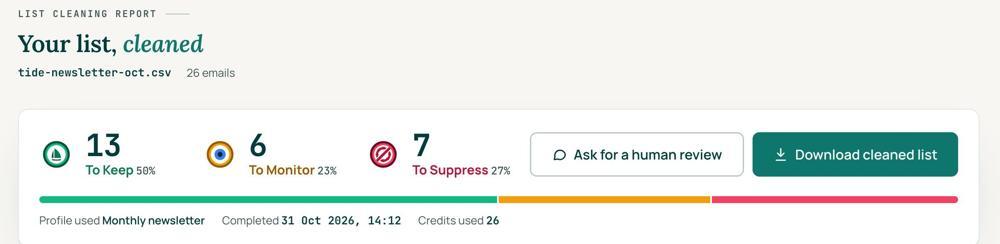
 To KeepSend to it.
 To MonitorSend carefully and watch what happens.
 To SuppressStop sending to it, and keep the record of who you stopped emailing.
Your first 1,000 are free
Create an account and your first 1,000 addresses are free. No card is needed to sign up. After that you pay for the size of your list, from $0.0080 an address down to $0.0026 at volume, with an $8 minimum. There is no subscription and no monthly minimum.
Human Review
If you want a person to look, ask for a Human Review from your report, and Yanna-Torry goes through your list herself.
Your next step. Cleaning never makes a found list lawful. It can tell you an address works, never that you may email it. If you may email them, check them before the first send. Upload the list and clean your first 1,000 addresses free at reviewmyemails.com/get-started. Not sure where a list stands? Ask the free SOS line before you send anything.
List cleaning does not fix SPF, DMARC, MX or blocklist problems. Those live in your sending setup, and they are a different job. A blocklist listing measures your sending, so it is never a reason to suppress anyone on your list. And nobody can promise you the inbox, so we do not.
Yanna-Torry Aspraki, Review My Emails
Email SOS Hotline, free
For those problems there is the Email SOS Hotline, our free help line. Tell Yanna-Torry what is going on and she will tell you what she would do. She reads every message herself and replies within 48 to 72 hours, with no pitch.
Ask the free SOS line Trust beats tactics™
Founded in 2020, based in Bolton, United Kingdom.
reviewmyemails.com/resources/found-email-addresses-check-before-you-send?c=web-p10-r22pdf · v1.1
Spotted something out of date?