
Inbox under review
ExampleStop or pause now
Fix the cause
Wait and watch
The reasoning, in plain English
Do this first
Free rescue guide and PDF
For: anyone whose emails suddenly started landing in spam or junk. Opens fell off a cliff, a customer said "it was in my spam", or a dashboard turned red.
The 60-second answer
Your email used to land and now it goes to spam or junk. This guide is the plan: six checks for the first hour, four steps to recover over the weeks after, and the moves that only make it worse. It is free and all of it is on this page.
Do not start changing things yet. Write down every change from the last 48 to 72 hours, then check authentication, blocklists and your provider tools in that order.
Find the kind of problem before you fix it. A broken setup hits all mail at once, a list problem shows in bounces and complaints, an engagement problem fades in slowly.
Recover with the people who want your email. Cut volume hard, send only to recent engagers, and plan for weeks, not days.
Every explanation on this page comes from the Email Almanac, our own library of more than 4,000 answers about email. You do not have to buy anything to read it.
Which case are you?
Answer a few plain questions, in the order of the first hour. The card shows what you found and what to do first.
Answer here and your row lights up, with what to do first. The PDF has every row and the full guide.
Inbox under review
ExampleThe reasoning, in plain English
Do this first
The guide
One line each. Tick them as you go. Open a step for the full explanation.
Part 1. The first hour: find what broke
Why:blocked mail never arrives. Mail sent to spam does.
Send a test to your own Gmail, Outlook and Yahoo accounts and look in the spam folder. Blocked mail never arrives. Mail sent to spam does. A delivery rate of 98 percent with opens that have collapsed points to the spam folder. Gmail almost always accepts the mail and files it in spam, so your email marketing tool still says "delivered". Microsoft is more likely to refuse it outright. One bad number is a blip. Three together is a pattern.
Why:list every change from the last 48 to 72 hours. Reputation effects show within 24 to 72 hours.
List every change from the last 48 to 72 hours: a DNS edit, new content, a jump in volume, a new segment. Reputation effects show within 24 to 72 hours, so a change from well before that is probably not your cause. Save screenshots of Google Postmaster Tools and Microsoft SNDS now, before those dashboards roll the days off.
Why:a broken record breaks all at once, everywhere, right after a change.
Before you touch anything else, check your authentication still passes. A broken record, often after a DNS edit, a hosting move or a domain transfer, can sink your sender reputation almost overnight. A broken record looks like a reputation problem, with one tell: it breaks all at once, everywhere, right after a change. A reputation problem slides over days or weeks. Check yours with our free SPF checker and DMARC checker.
Why:it is the fastest thing to rule in or out.
It is the fastest thing to rule in or out. Run our free blocklist check on your sending IP and your domain.
Why:everywhere at once points at authentication, a major blocklist or an outage. One provider points at that provider.
If delivery dropped everywhere at once, look at authentication, a major blocklist or an outage. If it is one provider, look for something that provider reacts to. Split your opens and clicks by the recipient's domain to find the odd one out. Gmail: check domain reputation and the spam rate in Postmaster Tools. SPF and DKIM should pass on more than 99 percent of mail, and complaints must stay under 0.1 percent. Microsoft: check SNDS. Green is normal, yellow means slowed down, red means blocked. If Microsoft slows you down while Gmail is fine, the cause is almost always your IP's reputation with Microsoft. Yahoo: its "policy reasons" bounce usually means complaints over 0.1 percent, a jumpy volume, or a list with too many hard bounces. Apple: publishes no sender tools. If only iCloud refuses you, it is likely Apple's own filtering. If every provider does, the cause is upstream.
Why:a spam rate above 0.3 percent does serious harm. Keep total bounces under 2 percent.
In Postmaster Tools, a spam rate below 0.08 percent is healthy, 0.08 to 0.1 percent is worth a look, 0.1 to 0.3 percent is a warning, above 0.3 percent does serious harm and above 0.5 percent is an emergency. The trend matters more than one day. Keep total bounces under 2 percent and hard bounces under 0.5 percent. If bounces passed 2 percent or complaints jumped after an import, the list is the likely cause. If neither moved and opens faded slowly, it is engagement.
Part 2. The weeks after: recover
Why:use your tool's pause, not delete. Delete wipes the queue and its data for good.
Stop marketing sends at once if Postmaster shows Bad, you are on Spamhaus SBL or XBL, complaints are over 0.3 percent, or there is an abuse incident. For a smaller drop, pausing the cold segments and slowing down usually beats a full stop, and transactional mail keeps flowing. Use your tool's pause, not delete. Delete wipes the queue and its data for good. Set aside anyone with no open or click in 180 days or more (90 days while you are being slowed down), anyone from a bought, scraped or inherited source, and role addresses.
Why:after a crash, providers start you from below zero, not from neutral.
After a crash, providers start you from below zero, not from neutral. Cut volume by 80 to 90 percent, send only to people who engaged in the last 30 to 60 days, and grow by 10 to 15 percent a step over four to eight weeks. Send once a week on a fixed day for at least three weeks. Each recovery send should keep complaints under 0.1 percent and bounces under 1 percent. If a segment misses, send to a smaller, more engaged group. Better subject lines will not fix it.
Why:only after two steady weeks of clean sends.
Only after two steady weeks of clean sends, add people who engaged in the last 60 days, at 10 to 20 percent of volume. Hold for three to five sends, then add the 90-day group, then the 180-day group in very small batches.
Why:the clock only starts once the cause is fixed. Plan for weeks, not days.
It comes in waves. In week one, hard bounces, complaints and deferrals fall. In weeks two and three, opens stop sliding. In weeks three and four, Postmaster reputation trends up. A mild dip from one bad campaign takes one to two weeks, moderate damage two to four weeks, and a severe collapse four to eight weeks or longer. The clock only starts once the cause is fixed. Plan for weeks, not days. Afterwards, hold volume 20 to 30 percent below where it was for at least a month, and keep the segments that caused it out for good.
Your plan
What you found, and what to do first
| What you found | Do this first |
|---|---|
| Everything broke at once, everywhere, right after a DNS, hosting or setup change | Fix SPF, DKIM and DMARC first. Cleaning will not fix this. Use the free SPF and DMARC checkers or ask the free SOS line |
| You are on Spamhaus SBL or XBL, or another major blocklist | Stop marketing sends. Fix the cause first, then ask for removal. Cleaning the list will not get you off it. Run the free blocklist check or ask the free SOS line |
| Only one provider, with authentication passing | Work in that provider's own tools: Postmaster Tools for Gmail, SNDS for Microsoft |
| Bounces passed 2 percent, or complaints jumped, after an import or a new list | Pause that segment now. Clean the list before it is mailed again, then restart small |
| A slow slide over weeks, nothing broken and nothing new | It is engagement. Send only to people who engaged in the last 30 to 60 days and restart small |
| Postmaster shows Bad, or complaints are over 0.3 percent | Stop all marketing sends until you know the cause. Transactional mail keeps flowing |
| One bad day, then normal | Wait 24 to 48 hours before you change anything. A dip that clears within a day or two needs no fix |
| You are in Promotions, not spam | Not a delivery failure. Look only if engaged readers moved there suddenly |
No. Promotions is a tab inside the inbox, not the spam folder. Spam is a verdict on trust. Promotions is a verdict on what kind of email it is. Landing there by default is not a delivery failure. A sudden move from Primary to Promotions for engaged readers is worth a look.
Keep a log for every incident: the symptom, when you spotted it, the cause, the fix and how long recovery took. Without one, nobody can tell who edited the SPF record or imported the bad segment, and the next investigation loses days.
| Date and time | What changed | Who changed it | What you saw after | Fixed on |
|---|
Worked example. Coral Seaforth runs email for Seaglass Ceramics. On Monday her newsletter's opens halve, and her own Gmail test lands in spam. She writes down the week's changes: no DNS edits, but on Saturday someone imported newsletter-q3.csv, an old list from a trade show. SPF, DKIM and DMARC all pass on the free checkers, and the blocklist check is clear. Postmaster shows Gmail's spam rate at 0.2 percent, a warning, and Saturday's send bounced over 3 percent. That is row 4: a list problem. Coral pauses the imported segment, sends only to people who engaged in the last 30 days at a tenth of her usual volume, once a week, and logs every step. Before anyone from the old file is mailed again, she uploads it to Review My Emails. Every address comes back To Keep, To Monitor or To Suppress, with the reason in plain English. Four weeks later Postmaster is trending back up.
Review My Emails
You sign up, upload your list and get every address back with one decision and the reason, in plain English. Big lists take a while, so we email you when yours is ready.
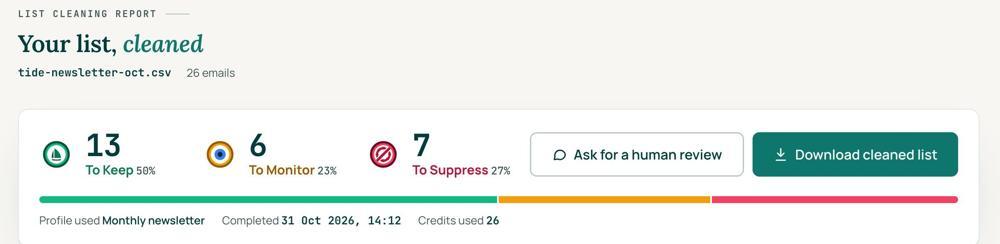
 To KeepSend to it.
 To MonitorSend carefully and watch what happens.
 To SuppressStop sending to it, and keep the record of who you stopped emailing.
Your first 1,000 are free
Create an account and your first 1,000 addresses are free. No card is needed to sign up. After that you pay for the size of your list, from $0.0080 an address down to $0.0026 at volume, with an $8 minimum. There is no subscription and no monthly minimum.
Human Review
If you want a person to look, ask for a Human Review from your report, and Yanna-Torry goes through your list herself.
Your next step. If the list was the cause (row 4), or you are about to bring old segments back, clean it first. Upload it and clean your first 1,000 addresses free at reviewmyemails.com/get-started. If it is your setup (row 1), cleaning will not fix it. If it is a blocklist (row 2), fix the cause first, then ask for removal. Use our free SPF checker, DMARC checker and blocklist check, or ask the free SOS line at reviewmyemails.com/sos.
List cleaning does not fix SPF, DMARC, MX or blocklist problems. Those live in your sending setup, and they are a different job. A blocklist listing measures your sending, so it is never a reason to suppress anyone on your list. And nobody can promise you the inbox, so we do not.
Yanna-Torry Aspraki, Review My Emails
Email SOS Hotline, free
For those problems there is the Email SOS Hotline, our free help line. Tell Yanna-Torry what is going on and she will tell you what she would do. She reads every message herself and replies within 48 to 72 hours, with no pitch.
Ask the free SOS line Trust beats tactics™
Founded in 2020, based in Bolton, United Kingdom.
reviewmyemails.com/resources/emails-going-to-spam?c=web-p10-r02pdf · v1.1
Spotted something out of date?